Groups and permissions
Grant List, Download, Upload, Delete and New Folder per group, per share. Someone in two groups gets the union — adding a person never takes access away.
macOS · Windows · Linux
FileServe turns a computer you already own into a file server. Publish folders to groups, set exactly who can do what, and hand people a browser address — there's no client to install, no cloud account and no monthly bill.

Features
Built for a studio, an office or a house full of people: real permissions, real limits, and a record of everything that happened.
Grant List, Download, Upload, Delete and New Folder per group, per share. Someone in two groups gets the union — adding a person never takes access away.
Cap downloads and uploads by day, ISO week, month or in total — per folder grant and per account across the whole server. Limit how many transfers someone runs at once.
Hand out a file or folder as an address — for anyone, or for particular accounts — with optional expiry. Folders open as a photo and video gallery with a full-screen viewer.
Every sign-in, transfer, deletion and refusal is recorded and filterable by person, action and date. Refusals are logged, not just successes.
See who's signed in and what's moving right now — speed, progress and time left. Report bandwidth by day or hour, by account, over any window.
Uploads are scanned once whole and only moved into place if clean — by Windows Defender through AMSI, or a ClamAV daemon on macOS and Linux.
Open a tunnel from the tray to get a public HTTPS address for people outside your network. Close it and the server is back to LAN-only.
Download the whole configuration — accounts, shares, quotas, history and log — as one consistent file while serving. Restore checks the backup before touching anything.
Start and stop the server, open the tunnel and copy the address from the menu bar. The icon turns green while somebody is connected. Starts at login if you want it to.
Tour
The desktop app has no screens of its own — it's a window onto its own server. Whatever an operator does from the machine, they can do from anywhere on the network.
Shares Folders on this machine, published to groups with the permissions and quotas each one gets.
Sharing
Click 🔗 beside any file, or Share on a folder. Pick who it's for — anyone with the link, or particular accounts — and when it should stop working.
127.0.0.1.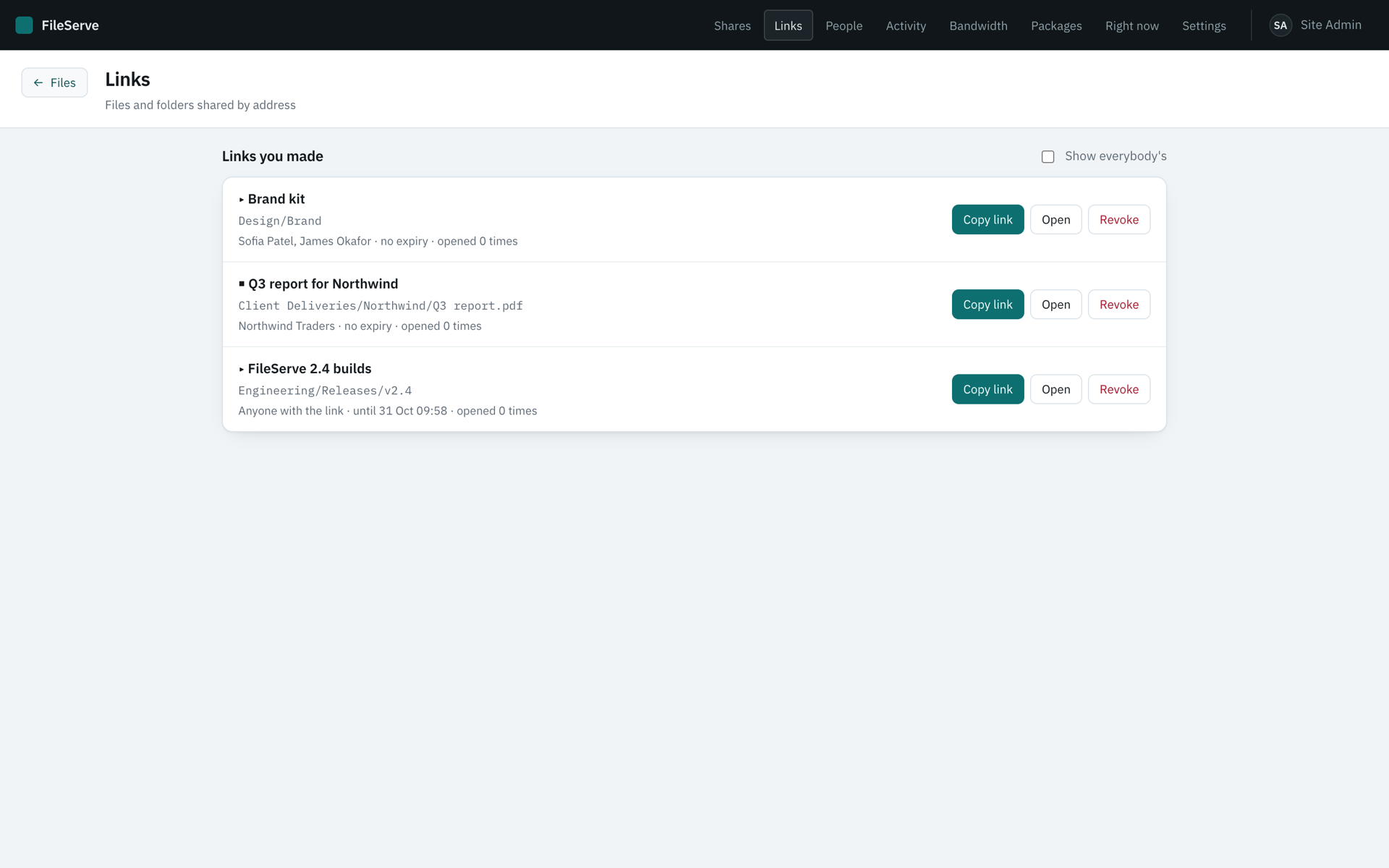
Package feeds
Switch them on in Settings and the same server hosts /nuget and /npm. Personal access tokens authenticate them; the same groups govern them.
# NuGet
$ dotnet nuget add source \
    http://server:8080/nuget/v3/index.json \
    -n fileserve -u me -p sfs_…
$ dotnet nuget push My.Package.1.0.0.nupkg \
    -s fileserve -k sfs_…
Your package was pushed.

# npm
$ npm config set registry http://server:8080/npm/
$ npm login --auth-type=legacy
$ npm publish
+ @team/ui@2.4.0
Security
Nothing is seeded on first run. The administrator is created by whoever opens the app — and only from the machine running it.
An account the whole internet knows the password to is worse than none, so there isn't one. The first admin is created locally.
A share you have no grant on answers 404, not 403. You don't learn it exists.
Passwords are PBKDF2-SHA256 at 210,000 iterations. Access tokens are 256 random bits, stored only as a hash.
Every file operation goes through one check that rejects .. and verifies the canonical path against the share root, symlinks included.
Requests must name the server by IP, its own host name or the open tunnel. Anything else gets a 421.
Accounts lock after repeated failures, and a wrong password on a locked account reads exactly like any other wrong password.
Length, character classes, common-password checks and maximum age — validated by the server on every path, not just in the browser.
Loopback sign-in only applies to connections that didn't arrive through the tunnel. No header can claim it.
Technology
One C# codebase drives three native desktop heads, an embedded HTTP server and a WebAssembly portal. JSON is source-generated end to end — no reflection, trim-safe on every platform.
Desktop
Server · :8080
Browser
The runtime, C# and source-generated JSON throughout.
The desktop shell — WinUI on Windows, plus AppKit and GTK4 heads from dotnet/maui-labs.
The whole portal, in C#, running in the browser.
The embedded HTTP server, plus its NuGet feed and npm registry packages.
A JSON document store over a single SQLite file: users, shares, quotas, the log.
Hosts the embedded portal, installs signed updates, and opens the public tunnel.
Shiny.Blazor.Controls for the portal, Shiny.Maui.Controls for the desktop shell.
Start at login and native desktop notifications on every platform.
Everything in one file, backed up live through the online backup API.
Upload scanning via nClam to a clamd daemon, or Windows Defender through AMSI.
Public HTTPS tunnels, opened and closed from the tray.
Signed, notarized macOS builds, Windows installers and .deb/.rpm packages on every tag.
Download
Official builds live only on the GitHub Releases page. The app checks for new versions when it starts and updates itself on macOS and Windows.
Apple silicon · signed & notarized
FileServe-<version>-macos-arm64.zipx64 & Arm64 · per-user installer
FileServe-<version>-windows-<arch>-setup.exex64 & arm64 · .deb and .rpm
FileServe-<version>-linux-<arch>.deb / .rpmEvery release includes SHA256SUMS.txt. On Linux, WebKitGTK 6 is required — Ubuntu 24.04, Debian 12 or newer.